
Are you a 1L? READ THIS!

ARE YOU REGISTERED? IF NOT…Please do! Follow the steps below after logging into myMemphis.
STEP ONE: Choose the STUDENT tab at top of the page.
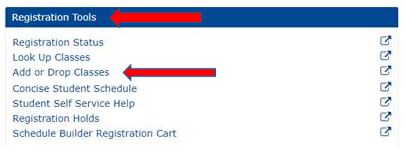
STEP TWO: On your student page, under REGISTRATION TOOLS choose ADD OR DROP CLASSES.
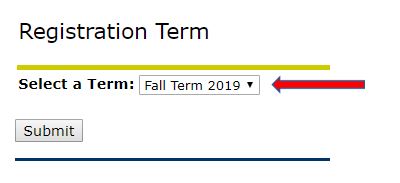
STEP THREE: From the drop-down box, choose SPRING 2020. Then, click the Submit button.
STEP FOUR: Enter the CRN for corresponding courses into boxes at the bottom of the page.
NOTE: Refer to our Course Schedule for the appropriate CRNs. You are required to remain in your section (11 or 12 and Legal Methods).

STEP FIVE: Submit changes.
