New IT Ticket System – What it means for you!
What To Know
Information Technology Services has implemented a new ticket system, and Law IT has been asked to use this system for all technology requests and issues going forward. What do you have to do? Nothing! IT will continue to resolve issues and help with requests just like we always do! However, there are two important things that will change:
- If you have an issue, we will ask for your name and/or email address. This allows us to put a ticket in the system to keep track of the issue, as well as notify you when the problem is resolved.
- When we put in tickets for you, you may receive emails like the one below:

These emails and the links within them are legitimate. You do not have to reply or click anything in these emails, but you are more than welcome to do so if you would like. Feel free to read each one very carefully, or setup an email rule to automatically delete them!
That covers all of the important changes. If you’re still interested, there are a few tips below that you might find helpful about the new system.
Ticket System Tips
- You can reply to ticket emails to add notes to them, but if the information is time sensitive or very important, your best bet is to email LawIT@memphis.edu.
- You can enter tickets of your very own! Simply go to http://umhelpdesk.memphis.edu and login with your University of Memphis username and password. This will take you to the Self-Service portal:

- From this page you can click on “Request a Service” and then select a category for your issue:

- As an example, let’s say that a computer’s mouse is not working in one of our labs. We can type “computer lab” in the search box, and it will show us the appropriate service requests:

- Once we click on “Computer Lab”, we are taken to a new tab with a new button to click – “Request Now”.
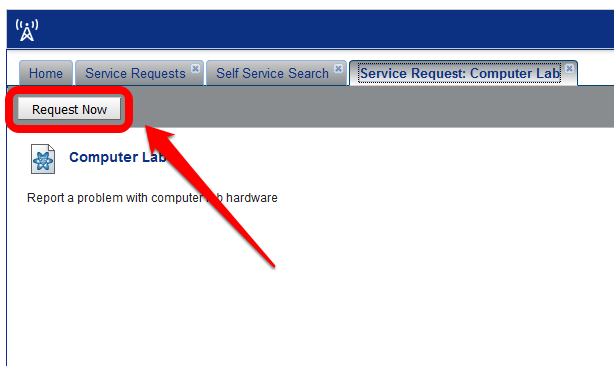
- After clicking “Request Now”, we can put in the appropriate information about our building and the issue, and the ticket will be routed to the IT staff here at Law to resolve!

- From this page you can click on “Request a Service” and then select a category for your issue:


- More background on the new system can be found here: http://www.memphis.edu/umtech/service.php.
- Documentation on how to use the system is available here: http://www.memphis.edu/umtech/solutions/remedyforce.php.
- Last but not least – Law IT staff is still always available for in person assistance in Room 207 from 8am to 4:30pm, Monday through Friday, or via email at LawIT@memphis.edu. You can also reach out to the University of Memphis Service Desk, which is available 24/7 at (901) 678-8888, via email at umtech@memphis.edu, or via online chat.