
REMINDER: Complete your SETE!
The law school’s SETE online course evaluations period began Monday, October 31 and runs through Monday, November 21 at 11:59p.
SETE allows you to evaluate your courses and professors. Your honest and complete feedback is crucial to the success of the law school. Neither your name nor any identifying information is given to the evaluated instructor—it’s 100% anonymous. The most important part of the SETE form is the comments section at the top of the form. Please take the time to complete the comment section of the SETE evaluation. Your professors do NOT have access to the SETE evaluations until after fall grades are final and posted in January.
To complete SETE:
- Open any internet browser.
- Go to www.memphis.edu and logon to your my.memphis.edu account.
- Go to the Student tab.
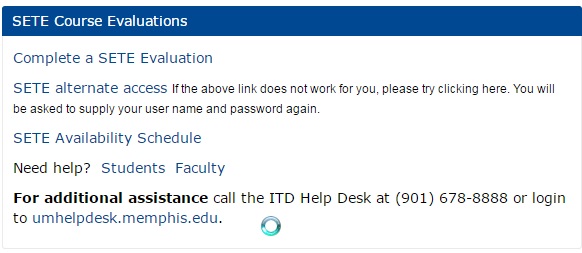
- Find the SETE Course Evaluations box.

- Click Complete a SETE Evaluation.
- Click on each listed course.
- Evaluate the course and course instructor.
- Hit the submit button.
- SETE Problems? Call the help desk at 678.8888.
Your course professors will likely use class time to allow you to complete SETE. If not, you may complete SETE at any time during the evaluation period.
Please email Dean Mulroy (smulroy@memphis.edu) with any questions.
